Six Step Secure Patient Messaging Checklist for Australian Clinics
Secure patient messaging is the encrypted, auditable exchange of clinical documents between healthcare providers, built on Australia’s Secure Message Delivery (SMD) and National Secure Messaging Network (NSMN) standards. If your clinical information system and messaging provider are conformant, it should replace fax and email as your default channel for referrals and results. The one caveat that trips up most practices: confirm your network reach and NASH PKI certificate status before you rely on it for a critical referral pathway.
TL;DR:
- Confirm your practice’s clinical information system supports NSMN conformance and ensure your NASH PKI certificate is valid ahead of renewal to avoid silent message blocking.
- Test secure message delivery with top referral partners before going live, and verify that your chosen provider network reaches all intended recipients to prevent communication gaps.
- Implement standardized referral templates with clear patient identifiers, titles, and designated inbox owners to streamline triage and reduce missed or delayed results.
- Maintain meticulous certificate management, including ownership designation and renewal reminders, and document fallback procedures when network reach or recipient recognition issues occur.
- Address common failures such as unrenewed certificates, poor message titling, or unassigned inbox ownership, which account for most operational disruptions rather than security breaches.
Table of Contents
- What is secure patient messaging and where clinicians use it?
- Benefits for clinicians, practices and patients
- How secure messaging works: encryption, routing and certificates
- Implementation checklist: what your practice needs and the usual steps
- Interoperability and limitations: checking network reach before you commit
- Clinical operational best practice: templates, titling and inbox triage
- Security, privacy and regulatory considerations for clinical practice
- Getting started: a six-step action plan for clinics
- Training staff and managing the change to secure messaging
- Solving integration problems with your existing clinical software
- Responding to a secure messaging security incident
- Practical perspective: what actually breaks in clinics
- How Meddle helps you turn secure messaging into a working referral system
- Sources
- FAQ
What is secure patient messaging and where clinicians use it?
Secure Message Delivery is the technical specification that lets one clinical information system send an encrypted document to another, with delivery confirmation built in. It differs from standard email in one crucial way: SMD encrypts the payload end to end and ties every exchange to a verified provider identity through a NASH PKI certificate, rather than relying on a password or a hope that the wrong inbox doesn’t open it. Consumer messaging apps offer neither the encryption standard nor the audit trail that clinical correspondence needs, which is why the RACGP names secure messaging as the preferred method for clinical correspondence.
The National Secure Messaging Network is the collection of accredited providers and directory services that make SMD work at scale across general practice, specialists, allied health, hospitals and pathology providers. You’ll encounter secure messaging most often for:
- Referrals sent from a GP to a specialist or allied health provider, carrying structured clinical detail rather than a scanned letter.
- Discharge summaries from hospitals back to the referring GP, often the most time-critical document in the whole system.
- Pathology and radiology results, delivered directly into the ordering clinician’s inbox rather than printed and posted.
- Specialist reports and correspondence flowing back to the GP after a consultation.
- System notifications, such as delivery acknowledgements confirming a message reached its destination.
Most of this traffic is one-way, clinician to clinician. Two-way and patient-facing secure messaging exists but is less mature across the network, and worth checking separately if patient-to-clinician messaging is part of your plan.
Benefits for clinicians, practices and patients
The operational case is straightforward: less postage, no fax toner, and far less manual re-keying of referral data into your clinical information system. When secure messaging integrates properly with your software, structured fields populate automatically instead of a receptionist retyping a patient’s details from a scanned PDF.
The clinical case is stronger. Evaluations of secure messaging report it reduces reliance on insecure text messaging for clinical handover and supports smoother transitions of care between hospital and community settings, though inbox burden and inconsistent message routing remain genuine implementation challenges. Faster, more reliable delivery of discharge summaries means a GP sees a patient’s hospital stay before that patient walks back into the consult room, not two weeks later.
Secure messaging at scale: Australia’s secure messaging network already carries millions of messages a year across tens of thousands of participating practitioners, which tells you this isn’t a niche pilot. It’s core infrastructure most of the sector already depends on.
For patients, the benefit is less visible but real: their results and referral letters move between providers without sitting in a fax tray or a shared email inbox, and they stop repeating their history at every appointment because the previous provider’s notes actually arrived, as demonstrated by Dr. Luigi Manzi’s approach to publishing contact details and integrating secure communication in clinical practice (Dr. Luigi Manzi - Chirurgo Ortopedico Specializzato in Piede e Caviglia).
Benefits clinics report once secure messaging is embedded properly:
- Fewer duplicate pathology and imaging orders because prior results are visible sooner.
- Reduced administrative time spent chasing paper referrals or resending faxes.
- A documented audit trail for every message sent and received, useful for both clinical governance and complaints handling.
- Better continuity when a patient sees multiple providers across a care team.
How secure messaging works: encryption, routing and certificates
Every secure message follows the same basic path, whether it’s a two-line referral or a full discharge summary with attachments. Understanding the sequence matters because it tells you exactly where things can go wrong, and where to look first when a message doesn’t arrive.
- Compose. The sending clinician creates the message inside their clinical information system, either as a structured referral or as a document with attachments.
- Encrypt. The sender’s secure messaging provider encrypts the payload before it leaves the practice network, using the sender’s NASH PKI certificate to prove organisational identity.
- Route. The message travels through the sender’s provider to the receiver’s provider, using directory lookups to find the correct destination address.
- Decrypt. The receiving provider decrypts the message using the appropriate certificate and identity checks.
- Integrate. The message lands inside the receiving clinician’s clinical information system, ideally auto-filing against the correct patient record.
- Acknowledge. A delivery receipt is sent back to the originating system, confirming the message arrived, which is the audit trail your practice relies on if a referral is ever queried.
That whole sequence is what the ADHA’s secure messaging fact sheet documents in detail, and it’s worth reading once even if your software vendor handles the technical side for you.
The NASH PKI certificate is the trust anchor for the entire system. It’s issued to your organisation, not to an individual clinician, and it authenticates your practice to every other participant on the network. Certificates aren’t permanent. They expire on a renewal cycle, and letting one lapse is one of the most common failure modes practices encounter, quietly blocking outgoing and incoming messages until someone notices.
Two directory services sit behind the scenes and do work you’ll rarely think about once set up. The Healthcare Provider Directory (HPD) lists your organisation’s secure messaging address so other providers can find you, and Endpoint Location Services (ELS) let sending systems automatically resolve where a message should actually go.
“Conformant” clinical software means your vendor has built to the NSMN and ATS-5822 specifications and passed the conformance testing implementers must complete. Ask your vendor directly whether your specific version is conformant, not just the product family.
Pro Tip: Set a calendar reminder 60 days before your NASH PKI certificate expiry, not 30. Renewal can involve identity verification steps that take longer than expected, and a lapsed certificate stops messages silently rather than throwing an obvious error.
Implementation checklist: what your practice needs and the usual steps
Before you switch on secure messaging, three prerequisites need to be in place: conformant clinical information software, a reliable internet connection, and a nominated Responsible Officer who owns the certificate and provider relationship. Skipping any of these usually surfaces as a support ticket three weeks into rollout.
- Confirm CIS conformance. Ask your software vendor to confirm your version meets NSMN specifications, not just that the product supports “secure messaging” generically.
- Obtain your NASH PKI certificate. Apply through the appropriate identity verification process and install it against your organisation’s record, then schedule renewal reminders immediately.
- Register with a secure messaging provider. Choose a provider your vendor supports natively, and publish your organisation’s address in the Healthcare Provider Directory.
- Configure message types. Set up which document types (referrals, results, discharge summaries) route automatically into which parts of your clinical software.
- Test with primary referral partners. Send test messages to your three or four most frequent referral destinations before relying on the system for live clinical traffic.
- Update referral templates and go live. Roll out structured templates to clinical staff and monitor delivery acknowledgements closely in the first fortnight.
Practical considerations that affect your timeline and budget:
- Certificate issuance and provider registration typically take longer than the technical setup itself, so start the paperwork early.
- Costs vary by clinical software vendor and secure messaging provider; some bundles secure messaging into existing licensing, others charge separately.
- Allow several weeks between decision and go-live if your practice hasn’t previously used secure messaging, mostly waiting on certificate processing and vendor configuration slots.
- A security-focused vendor assessment before signing helps confirm the software you’re buying actually meets the conformance bar you need.
Interoperability and limitations: checking network reach before you commit
Vendor fragmentation is the honest limitation of secure messaging in Australia. Multiple secure messaging providers operate across the network, and not every provider talks to every other provider by default. The RACGP flags this directly, noting that interoperability gaps between vendor systems remain a significant barrier to universal adoption even though the underlying standards are shared.
Before you assume secure messaging will reach a particular referral partner, check. Ask the receiving practice which provider they use, and run a test send well before you need it for a live referral. Don’t assume reach just because both practices use “secure messaging” generically; the specific provider pairing matters.
Where gaps exist, a few mitigations work in practice:
- Dual-provider setups, where a practice or a secure messaging provider maintains gateways to more than one network to widen effective reach.
- Web-based secure exchange portals as a fallback for one-off correspondence with a partner outside your primary network.
- Documented manual fallback processes, agreed in advance with frequent referral partners, so staff know exactly what to do when a message bounces rather than defaulting to an unsecured email.
Secure messaging won’t fix a poorly structured referral, and it won’t force a receiving clinician to read their inbox promptly. It solves transport security and delivery confirmation. Everything downstream of “the message arrived” is still an operational and clinical governance question for your practice.
Clinical operational best practice: templates, titling and inbox triage
The technology only pays off if your team treats the inbox as clinical workflow, not as another email folder to check when there’s time. Structured referral templates matter more than most practices expect: a consistent format with clear headings for history, medications and the specific clinical question makes triage faster on both ends, and reduces the back-and-forth phone calls that secure messaging was supposed to eliminate.
Message titling deserves its own rule. A subject line reading “Referral” tells the receiving practice nothing; “Referral: Smith J, DOB 04/1978, right knee, urgent” lets reception route it correctly in seconds. Every message should carry unambiguous patient identifiers, matching the standard your practice already applies to paper and phone referrals.
Inside your clinical information system, assign inbox roles rather than leaving secure messaging as one shared queue. A practice nurse or triage clinician checking the inbox each morning, with clear escalation rules for urgent results, prevents the single biggest failure mode: a critical result sitting unread because nobody owned the inbox that day.
- Standardise referral templates across the practice, not per clinician.
- Title every message with patient name, date of birth and a specific clinical descriptor.
- Assign a named inbox owner with a documented backup for leave periods.
- Set CIS rules to flag duplicate messages before they’re actioned twice.
- Retain messages per your standard clinical record retention period and include them in regular audits.
Pro Tip: Run a quarterly audit of ten random secure messages against your titling standard. Most practices find drift within months of go-live, and it’s a five-minute fix once you spot it.
Security, privacy and regulatory considerations for clinical practice
Secure messaging doesn’t remove your obligations under the Australian Privacy Principles, it just gives you a better tool for meeting them. Align your processes with Office of the Australian Information Commissioner guidance on handling health information, and treat certificate management as a governance task, not just an IT one.
Where email genuinely is your only option for a particular partner, document the decision. Record patient consent for that channel, note the risk assessment your practice made, and apply basic safeguards: password-protected attachments, confirmation of the correct recipient address, and a clear internal policy on when email fallback is acceptable versus when it isn’t.
- Assign clear ownership of NASH PKI certificate renewal, with a backup contact.
- Maintain a documented incident response pathway for suspected message misdelivery or a lapsed certificate.
- Record consent whenever email is used as a fallback for clinical correspondence.
- Review your secure messaging provider’s own privacy and security practices annually, not just at onboarding.
Getting started: a six-step action plan for clinics
If you’re starting from zero, keep the rollout tight and sequential rather than trying to fix everything at once.
- Decide the scope of rollout and name a Responsible Officer who owns the project.
- Confirm your clinical information system’s conformance and request your NASH PKI certificate.
- Select a secure messaging provider your vendor supports and register your organisation’s address.
- Test message delivery with your top three to five referral partners before going live broadly.
- Update referral and discharge templates, and brief clinical staff on the new titling standard.
- Monitor delivery acknowledgements and inbox activity daily for the first two weeks, then weekly after that.
Each step builds on the one before it. Skipping straight to “go live” without partner testing is the single most common cause of early frustration, and it’s entirely avoidable with a fortnight of preparation.
Training staff and managing the change to secure messaging
The technology rarely fails first; the habits around it do. Staff who’ve spent years checking a fax machine or a shared email inbox need a deliberate handover to a new triage habit, not just a login and a one-line email announcement.
Run a short, role-specific training session rather than one generic briefing. Reception staff need to understand titling and identifiers; clinical staff need to understand how messages appear inside the CIS and what an escalation looks like; whoever owns the inbox needs to understand delivery acknowledgements and what a failed delivery looks like on screen.
Give the change four to six weeks of active oversight rather than assuming it will stick after week one. Early on, run the old and new channels in parallel for your highest-risk correspondence, such as urgent pathology results, until your team trusts the new system completely. Nominate a super user, usually a practice nurse or senior receptionist, who fields questions in the first month so problems get solved on the day rather than escalating into missed messages.
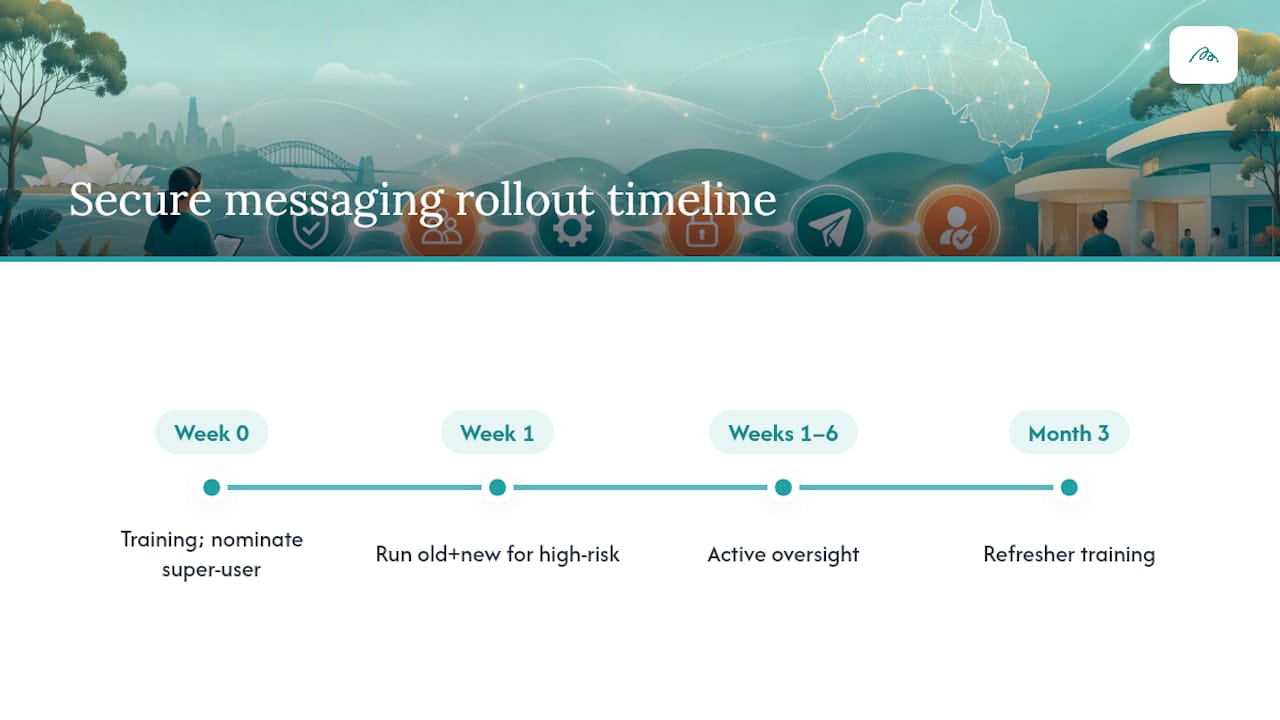
Revisit training after three months. Habits drift, new staff join, and a short refresher catches titling and triage errors before they become entrenched.
Solving integration problems with your existing clinical software
Even fully conformant systems don’t always handle secure messages identically. One vendor’s clinical information system might auto-file a discharge summary against the correct patient record; another might drop it into a generic inbox requiring manual matching. EHR vendors handle inbound and outbound routing inconsistently in practice, which is exactly the kind of gap that causes duplicate filing or a missed result.

The fix starts with your vendor relationship, not with workarounds. Ask specifically how your CIS matches incoming messages to patient records, what happens when a match fails, and whether attachments route separately from the message body. Some systems handle these cleanly out of the box; others need configuration your vendor should walk you through at setup, not leave you to discover during a busy Monday morning.
Where your CIS struggles with routing accuracy, a platform that layers structured referral and workflow automation on top of your existing software can close the gap without forcing a full system replacement. That’s a meaningful distinction: you don’t need to abandon your clinical software to fix a routing problem, you need better rules sitting between the message arriving and its reaching the right clinician’s queue.
Budget time for this in your implementation plan. Vendor support tickets for routing configuration often take longer to resolve than the initial certificate and registration steps combined, so raise them early rather than after go-live.
Responding to a secure messaging security incident
A lapsed NASH PKI certificate is the most common “incident” you’ll actually face, and it’s rarely malicious. Messages simply stop delivering, often silently, until someone notices a referral partner hasn’t heard back. Your first response step should always be checking certificate status before assuming a security breach.
For genuine incidents, a documented pathway matters more than a perfect one. At minimum, your practice needs a named contact responsible for triggering the response, a process for contacting your secure messaging provider to confirm whether a breach originated on their side or yours, and a plan for notifying affected referral partners if patient information may have been misdirected.
If a message is confirmed sent to the wrong recipient, treat it as a privacy incident under your existing OAIC-aligned processes, not as a separate secure messaging problem. Document what happened, who was notified, and what changed afterward. Review whether the error was a titling mistake, a directory misconfiguration, or a genuine system fault, because each of those has a different fix.
Build this into your existing clinical governance calendar rather than leaving it as an unwritten assumption. A ten-minute discussion at your next practice meeting about “what do we do if a secure message goes to the wrong provider” is worth more than any policy document nobody reads until the day it’s needed.
Practical perspective: what actually breaks in clinics
The failures I hear about most aren’t security failures at all. They’re a certificate nobody renewed, a message titled “Referral” that sat unread for a week, or an inbox with no named owner. Fix the paperwork discipline and the titling standard first. Standardised templates consistently cut triage time more than any software upgrade does, because the bottleneck was never the encryption. It was always the workflow around it.
— Taylor
How Meddle helps you turn secure messaging into a working referral system
Some platforms provide a layer between referral creation and patient consultation, using AI-powered matching and referral automation to reduce manual re-keying and improve routing efficiency.
For allied health clinics, that means less time spent chasing incomplete referrals and more consistency in how messages arrive, matching the templating discipline this guide has walked through. Meddle’s practitioner benefits page covers how the platform reduces admin load around intake and referral accuracy, and clinics wanting a managed route to better workflow integration can review the Simple Rollout, SMS Notifications and CRM Integration plans on Meddle’s pricing page to see what fits their practice size and referral volume.
If you’re specifically weighing up allied health referral pathways, Meddle’s Find Care directory shows how patients and referrers already connect with physiotherapists, psychologists, and other allied health providers through the platform. Check the provider’s website for current plan details before your next rollout decision.
Sources
- Secure messaging fact sheet — Australian Digital Health Agency
- Safe and effective electronic transfer of information to and from general practice — RACGP
- Evaluation of Direct Secure Messaging implementation and challenges — PubMed Central
- Secure messaging developer resources — ADHA implementer site
FAQ
What is secure messaging in healthcare?
Secure messaging in healthcare is the encrypted, auditable exchange of clinical documents such as referrals, discharge summaries and pathology results between healthcare providers. In Australia it runs on the Secure Message Delivery specification and NASH PKI certificates, which the ADHA fact sheet describes in detail.
What is the most secure form of text messaging for clinical use?
Standard SMS and consumer messaging apps aren’t built for clinical correspondence because they lack encryption standards and audit trails tied to verified provider identity. Secure Message Delivery through an accredited provider, authenticated by a NASH PKI certificate, is the standards-based alternative the RACGP recommends for clinical correspondence.
What is the best secure messaging option for healthcare professionals?
There’s no single “best” app; the right choice is whichever accredited secure messaging provider your clinical information system already supports natively, since compatibility drives reliability more than any individual feature. Practices wanting integrated referral workflow on top of standard secure messaging can look at platforms like Meddle’s practitioner benefits, which layers automation over existing systems rather than replacing them.
How do I access a secure message once it’s sent?
Secure messages typically arrive directly inside your clinical information system’s inbox, not in a separate app, once your NASH PKI certificate and provider registration are active. If a message hasn’t arrived as expected, check your certificate status first, then confirm the sender used a provider that reaches your network.
How much does secure messaging cost to set up?
Costs vary by clinical software vendor and secure messaging provider, and many bundle it into existing software licensing rather than charging separately. For clinics wanting integrated messaging alongside referral automation, current plan details are available on Meddle’s pricing page.